> ## Documentation Index
> Fetch the complete documentation index at: https://docs.eigenai.com/llms.txt
> Use this file to discover all available pages before exploring further.
# Getting Started
> Install, configure, and start using EigenData-CLI in minutes.
## Installation
### Supported Platforms
| OS | Architecture | Minimum Version |
| ----- | --------------------- | -------------------------------------------------------------- |
| macOS | Intel (x86\_64) | macOS 11 (Big Sur) |
| macOS | Apple Silicon (arm64) | macOS 11 (Big Sur) |
| Linux | x86\_64 | glibc 2.28+ (Ubuntu 20.04, Debian 11, RHEL/CentOS 8, or later) |
| Linux | arm64 | glibc 2.35+ (Ubuntu 22.04, Debian 12, or later) |
### Prerequisites
Before installing EigenData-CLI, ensure you have Node.js 18+ installed:
```bash theme={null}
node -v
```
If Node.js is not installed or is out of date, download it from [nodejs.org](https://nodejs.org/en/download).
### Configure npm Registry
Before installing, configure npm to use the EigenAI GitHub Packages registry — contact [support@eigenai.com](mailto:support@eigenai.com) to obtain your auth token, then run:
```bash theme={null}
echo "@eigen-ai-labs:registry=https://npm.pkg.github.com" >> ~/.npmrc
echo "//npm.pkg.github.com/:_authToken=YOUR_AUTH_TOKEN" >> ~/.npmrc
```
### Install EigenData-CLI
Choose the option that matches your environment:
Install globally so the `eigendata` command is available system-wide:
```bash theme={null}
npm install -g @eigen-ai-labs/eigendata-cli
```
Verify the installation:
```bash theme={null}
eigendata --version
```
Expected output:
```
$ npm install -g @eigen-ai-labs/eigendata-cli
added 1 package in 20s
$ eigendata --version
2.2.10
```
Install locally (no elevated permissions required):
```bash theme={null}
npm install @eigen-ai-labs/eigendata-cli
```
Verify the installation using `npx`:
```bash theme={null}
npx eigendata --version
```
Expected output:
```
$ npm install @eigen-ai-labs/eigendata-cli
added 1 package in 20s
$ npx eigendata --version
2.2.10
```
Replace `eigendata` with `npx eigendata` in all subsequent commands when using a local installation.
## Quick Start
### Launch EigenData-CLI
Start the CLI by running:
```bash theme={null}
eigendata
```
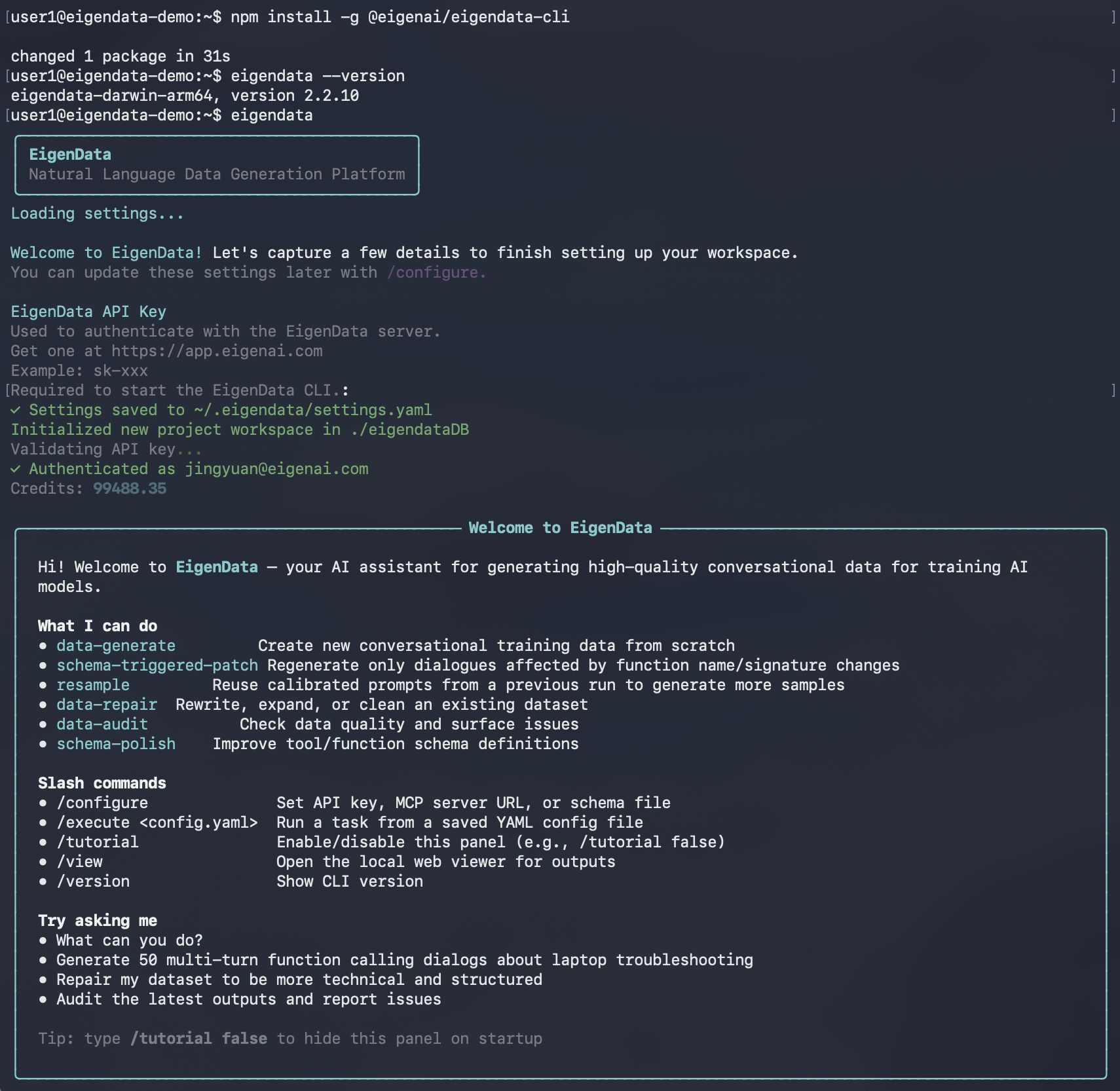
### First-Time Setup
When you run EigenData-CLI for the first time, it will guide you through the initial configuration:
**API Key**
You need an API key to authenticate with EigenData services. Get your API key from the [EigenAI](https://app.eigenai.com/api-keys) page.
```
EigenData API Key
Used to authenticate with the EigenData server.
Get one at https://app.eigenai.com/api-keys
Example: sk-xxx
Required to start the EigenData CLI.
> ********
```
After completing the setup, you'll see a confirmation:
```
✓ Settings saved to ~/.eigendata/settings.yaml
✓ Authenticated as user@example.com
Credits: 100.00
```
 ### Start Using EigenData-CLI
Once initialization is complete, you'll see the interactive prompt:
```
eigendata>
```
You can now start using natural language [`commands`](core-features):
```
eigendata> Generate 10 customer support dialogs about billing issues
eigendata> Analyze outputs/my_data.jsonl and report quality issues
```
## What's Next
Now that EigenData-CLI is installed and running, explore the key concepts and features:
* [Chatbot Interaction](/products/eigendata-cli/core-concepts/chatbot-interaction) - How you interact with the CLI through natural language
* [Function Schema](/products/eigendata-cli/core-concepts/function-schema) - Define the tools available for data generation
* [Domain & Reference Document](/products/eigendata-cli/core-concepts/domain) - Provide context for your data domain
* [Core Features](/products/eigendata-cli/core-features/schema-polish) - Schema polish, data generate, data repair, and data audit
* [/configure](/products/eigendata-cli/utility-commands/configure) - Update your settings at any time
### Start Using EigenData-CLI
Once initialization is complete, you'll see the interactive prompt:
```
eigendata>
```
You can now start using natural language [`commands`](core-features):
```
eigendata> Generate 10 customer support dialogs about billing issues
eigendata> Analyze outputs/my_data.jsonl and report quality issues
```
## What's Next
Now that EigenData-CLI is installed and running, explore the key concepts and features:
* [Chatbot Interaction](/products/eigendata-cli/core-concepts/chatbot-interaction) - How you interact with the CLI through natural language
* [Function Schema](/products/eigendata-cli/core-concepts/function-schema) - Define the tools available for data generation
* [Domain & Reference Document](/products/eigendata-cli/core-concepts/domain) - Provide context for your data domain
* [Core Features](/products/eigendata-cli/core-features/schema-polish) - Schema polish, data generate, data repair, and data audit
* [/configure](/products/eigendata-cli/utility-commands/configure) - Update your settings at any time